
Overview:
The Monthly Privacy Report provides a summary of Privacy Bee’s activities on your behalf, highlights any emergent risks, and gives an overview of your current privacy level. Your Monthly Privacy Report is available in two ways:
-
Via Email - Privacy Bee automatically sends your Monthly Privacy Report to your registered email address on the first of each month. Look for an email with the subject line “Privacy Report” followed by the month.
-
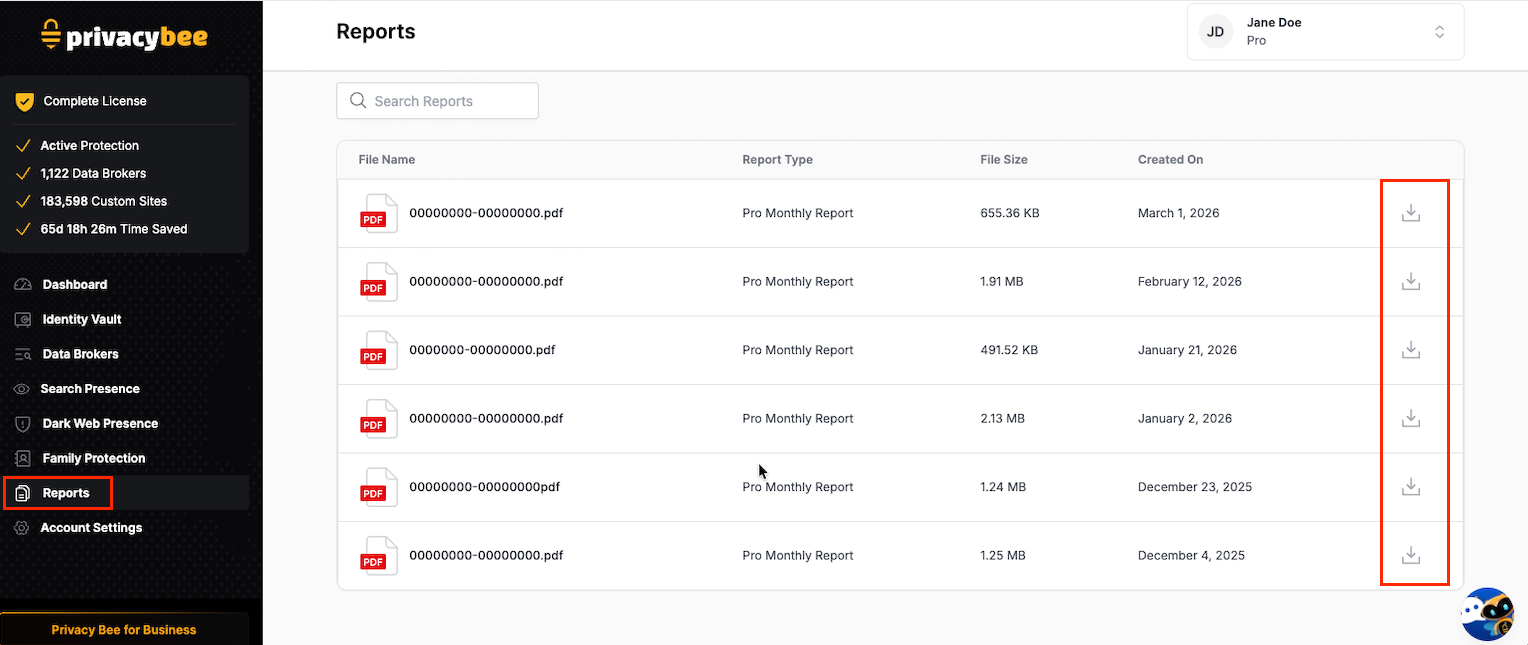
Via Your Account - You can also access your report directly in your Privacy Bee account at any time.
| To make sure you never miss a report, add @privacybee.com to your safe sender list or check your spam folder if you haven’t received one yet. |
|---|
${color}[#000000](Accessing Your Report)
1. Check Your Email
- Privacy Bee automatically sends your Monthly Privacy Report to your registered email.
- Look for an email with the subject line: e.g., “January Privacy Report.”
2. View Reports in Your Account
- Log in to your Privacy Bee account.
- On the left navigation bar, click Reports (highlighted in your screenshot).
What’s in the Report?
Your Monthly Privacy Report includes:
- A summary of Privacy Bee’s activity on your behalf during the month
- Any new or emerging risks identified
- An overview of your current privacy level and progress over time